Showing posts with label Tips. Show all posts

Thursday, February 2, 2012

Free Cloud Storage Providers

http://am9905d.hubpages.com/hub/Free-Cloud-Storage-Providers

Free Cloud Storage Providers

75

rate or flag this page

Facebook

By am9905d

Cloud Storage

Cloud storage allows users to safely store their files on the internet. The files are stored on a number of virtual servers for better security. During the last few years, several cloud storage companies and services have been launched offering a variety of plans. Here we are going to list only the providers that offer free cloud storage.

Free Cloud Storage Providers

Sunday, October 16, 2011

Delete or Clear Jumplist Recent Items in Windows 7


Delete or Clear Jumplist Recent Items in Windows 7

Posted on December 17, 2009 at 5:06 am

Back in the days, I wrote an article on how to clear the recent documents list in Windows XP. If you ever went to My Recent Documents in the Start Menu, you used to get a list of all the files you recently opened!

If you’re a privacy freak who doesn’t want someone random to see what kind of documents  you were opening, this came in pretty handy! However, with Windows 7, there is a new feature called a Jumplist. You can read my previous post on how to create your own jumplists.

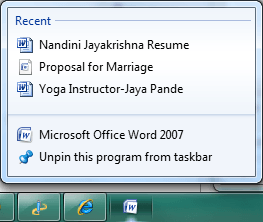
With Jumplists, that functionality basically moved from the Start Menu to the Taskbar! For example, if you open several Word documents and then right-click on the Word icon in the taskbar, you’ll get the following:

clear windows 7 jumplists

Hmm, maybe you didn’t want anyone to see that marriage proposal Word doc! Ok, bad example, but you see my point. The jumplist has a list of recent documents opened in Word. Great if you want quick access to a Word doc without having to browse in Windows Explorer, but not great if you want to hide this information.

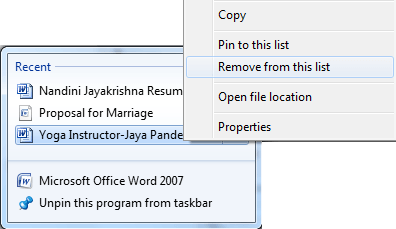
Now this is just Word! Each program can have it’s own list of recent documents or files or whatever else that show up. The only obvious way to delete the entries from the jumplist right now is to right-click on an item and choose Remove from this list.

remove jumplist items

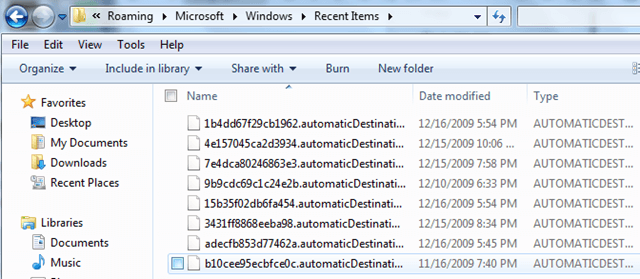
This is pretty painful for many different apps! Luckily, there is an easier way to remove multiple items from many jumplists at once. All recent items in any jumplists are stored by Windows in a hidden location. You can get to them here:

%APPDATA%\Microsoft\Windows\Recent\AutomaticDestinations

Copy and paste that into Windows Explorer. Now you will see a list of files with very long and convoluted names. This is because they are all encoded. Each one represents a list of recent items for a particular jumplist.

clear jumplists windows 7

It’s impossible to tell which entries go with which jumplists unless you open the file in a text editor and browse through. However, since all of the files are just recent items in a jumplist, you can delete all the files and it will clear all recent items on all jumplists.

You can also run a simple command from the command prompt to do the same thing:

del %appdata%\microsoft\windows\recent\automaticdestinations\*

You can then add this to a Windows batch file and run it by just double-clicking on the shortcut. You can read my previous post on how to create Windows batch files. [via gHacks]

Delete or Clear Jumplist Recent Items in Windows 7

Thursday, October 13, 2011

Her Campus: 7 Ways to Clean Up Your Facebook Profile For College Admissions


From -- http://www.hercampus.com/high-school/private-professional-7-ways-keep-your-facebook-profile-clean-during-college-admissions-p


7 Ways to Clean Up Your Facebook Profile For College Admissions

Posted: 10/10/11 03:47 PM ET

Follow

Facebook Privacy , Facebook , College Applications , Facebook College , Hercampus , High School News

At first, Lauren untags herself from any photos with red cups in sight. Next, she replaces obscene rap lyrics with sayings by Thoreau in her "Favorite Quotes" section. And finally, just minutes before hitting the "submit" button on the Common App, she changes the spelling of her name on Facebook to Loryn in an attempt at anonymity. Lauren isn't entering the witness protection program or hiding from the FBI -- she's simply using caution while applying to colleges. But do college admissions officers truly Facebook-stalk all incoming applicants? To what extent should you do a little Facebook spring-cleaning? Are there any red flags on your profile, and if so, how can you fix them? Her Campus sat down with Shawn Abbott, Assistant Vice President for Undergraduate Admissions at NYU, to learn more about what role Facebook plays in the college application process.

How do college admissions officers use Facebook?

A 2011 Kaplan study shows that more than 80 percent of colleges consider their applicants' social media presence when reviewing applications. However, if you're worried about college admissions officers picking through your Facebook profile with a fine-toothed comb, take comfort in the fact that admission committees aren't likely to spend hours looking through your junior varsity volleyball photo album or scrolling through status updates dating back to 2009.

While admissions officers do check for obvious no-nos -- wall posts from friends along the lines of, "I can't believe how out of control you were last night" and explicit profile pictures -- the goal of the search isn't to get applicants into trouble. "Admission counselors search for students on Google and other search engines -- sometimes out of curiosity and sometimes to verify claims that an applicant will make in his or her application with regard to leadership or involvement with a particular organization or activity," says Abbott. Considering this angle, keeping your profile easily accessible and searchable might actually work to your advantage -- as long as your profile is clean. "I treat my profile as a way for college admissions officers to get to know me outside of my academic accomplishments," says Meg Enciso, an HC High School Ambassador from Ontario.

Considering the high volume of applications each school receives, there's simply no time to launch extensive internet investigations on every applicant. "If I can't find someone on Facebook, I certainly don't spend an extraordinary amount of time hunting them down," says Abbott. If you change your name on Facebook, you may be able to dodge the profile scan. Don't let a new Facebook name lull you into a false sense of security, though; Abbott warns, "We sometimes receive screen shots of internet activity that can be called into question."

How are pre-collegiettes dealing with this issue?

"When I was in high school, I didn't change my Facebook at all during college admissions," says Caitlin Fernandez, a Her Campus Branch Manager, Campus Correspondent, and Virginia Tech sophomore. It appears that as Facebook becomes more widespread, students are becoming more cautious with their online presence. "Most of my friends have either deleted their accounts or intensified their privacy settings," says Deborah Vasquez, an HC High School Ambassador from Florida.

Some students strive to keep their profile out of sight by changing their Facebook name. While some opt for unusual spellings or replacing their first or last names with words (e.g., Olivia Sunshine), others replace their last name with their middle name. Kiley K., an HC High School Ambassador from Connecticut, says, "I use my middle name as my last because I don't want people who don't personally know me friend requesting me or checking out my profile, especially college admissions officers!"

1. How should you clean up your Facebook profile?

Cleaning up your Facebook profile doesn't have to be difficult. "Common sense is key," Abbott explains. "You don't have to live undercover on the Internet. You should simply avoid posting pictures or messages that could come back to haunt you later." Take his advice to heart and keep your profile professional with these easy adjustments.

Remove or untag problematic photos.
Go through your profile pictures, albums, and tagged pictures and remove or untag any photos that could potentially cause trouble. The rule of thumb? If you wouldn't want to show the photo to your grandparents, you don't want it on your Facebook, either. Specifically, make sure to remove all traces of photos that include:

  • Drinking and drugs - even if you're not the one holding the beer!
  • Party photos that don't have any illegal substances in view, but you look like you're having a little too much fun.
  • Nudity. (Beach vacation photos with your family? Totally okay. Party photos sans pants? Not okay at all.)
  • Make-out sessions with your boyfriend. We know you think the album is adorable, but college admissions officers might not.
  • Your profile picture is especially visible, so take extra precaution to ensure that it's G-rated and promotes a positive image.

How to do it:

  1. To remove a photo, click the "Remove Photo" link directly under the bottom right corner of the photo.
  2. To remove the tag, click on "Report/Remove Tag" on the bottom right corner of the screen.

2. Use Profile Review.

This feature is an easy way to keep your profile in check. Every time a friend posts on your wall -- whether in the form of a wall post, photo, video, or status update -- you will be required to approve it. This gives you ultimate control over what appears on your profile; there's no risk of questionable photos or wall posts appearing on your wall without your knowledge.

How to do it:

  1. Go to "Privacy Settings."
  2. Click on "How Tags Work."
  3. Select "Profile Review."

3. Edit your Profile.

Now would probably be a good time to remove "lax bros" from your Interests section. You don't need to broadcast a fake interest in medieval poetry or quantum physics (unless you truly have a passion for those subjects), but make sure the information in your profile is clean and professional. Check to see that your Favorite Quotes section is free of any references to illegal activities and obscene or offensive language.

How to do it:

  1. Click "About," right above your timeline.
  2. Scroll to the section you'd like to change, and edit your basic information, activities and interests, contact information, and more.
  3. Make sure to hit "Save Changes" at the end!

Her Campus: 7 Ways to Clean Up Your Facebook Profile For College Admissions

Thursday, September 15, 2011

Going Green, Fuel Efficiency, Organic Food, and Green Living - The Daily Green

Going Green, Fuel Efficiency, Organic Food, and Green Living - The Daily Green


TheDailyGreen.com is a consumer's guide to green living, with daily news, tips, recipes, features and more. In 2007, TheDailyGreen.com was named Best New Site in the annual min Best of the Web awards. In 2010, TheDailyGreen.com was voted "Best Blog" by readers in the annual Best of Green Awards. In 2011, TheDailyGreen.com joined forces with Good Housekeeping and the Green Good Housekeeping Seal on an exciting new content partnership.

The annual Heart of Green Awards honor individuals, businesses and organizations that, like TheDailyGreen.com, are helping to make green go mainstream. In 2009 and 2010, TheDailyGreen.com celebrated its awards with star-studded ceremonies at at the Hearst Tower in Manhattan (see video at right). In 2011, the awards' scope expanded with many more categories, more winners and more audience participation - with the advent of online voting.

Read more: http://www.thedailygreen.com/about/about-us#ixzz1XIE10F00

Saturday, April 23, 2011

Rosalind Wiseman: What Makes a Good Bullying PSA?

I blogged this because – I think there are words of advice for anyone who is trying to get a message to kids/or adults for that matter that not in their peer group…No matter what the issue…

A bad bullying prevention program or PSA:

1. Relies on gimmicks, like anti-bullying T-shirts, useless slogans like, "Bullying isn't cool. Don't do it," bracelets, pledges, and celebrity appearances as the principle educational strategy.
2. Depicts stereotyped situations.
3. Shows all white people at the center of the plot, or has token racial diversity. For example, the Queen Bee white girl with her backup Black and Asian friends.
4. Presents suicide as a natural consequence of being bullied and as a revenge fantasy against the bullies. Kids don't have to have suicide thrown in their face to take bullying seriously. Emphasizing suicide will make children think that any feelings less than that aren't worth reporting.
5. Portrays no realistic and comforting adult presence.
6. Provides no skills or strategies to stop bullying beyond, "Tell an adult" and doesn't acknowledge that telling an adult often doesn't help at all.
7. Assumes that bullying is always one-way.
8. Gives the primary motivations to not bully as that you will be punished or feel guilty.
9. Emphasizes blame.
10. Ignores the fact that most bullies think they're defending themselves or are at least justified; e.g. the victim deserves it. This is one of the primary reasons why a bully won't see themselves in these types of campaigns.


A Good Bullying Prevention PSA and Campaign:

1. Depicts realistic scenarios, knowing that if presented realistically the topic will hold the viewer's attention. (T-shirts, bracelets and celebrities are unnecessary.)
2. Incorporates the power, negative or positive, of the by-stander.
3. Clarifies, age appropriately, the difference between snitching and reporting.
4. Reflects young people's understanding and experience of race dynamics. i.e. while racism can be a weapon to bully, children have a nuanced perspective on race.
5. Understands how homophobia is tied to bullying.
6. Has an adult (maybe a parent) comforting a child.
7. Doesn't patronize the viewer.
8. Provides skills and inspiration in equal proportion to depicting the problem.
9. Is willing to acknowledge that adults can be part of the problem as well as help solve or improve the situation.
10. Inspires people to take the risk to publicly support victims and responsibly confront bullies.


Rosalind Wiseman: What Makes a Good Bullying PSA?

Friday, August 20, 2010

Free Online Invitations -- Pingg, Evite, My Punchbowl, etc.

I have been reviewing the potential for using online invitation systems for scheduling and managing invitation for a workshop on EndNote, EndNote Web, and Zotero at my institution and I thought I would share my thoughts....such as they are.  I googled online invitation systems and got evite and a few others right away and since evite didn't fit my needs, I looked further.  The best comparison I found of services was from squidoo, entitled "Free Online Invitation Comparison and Evite Alternatives".  After looking at the sites listed, I choose Pingg - http://www.pingg.com/.

The reason for my choosing is the layout options, the ability to customize as well as the fact that it contained the key elements I needed.  These essential elements included (1) ability to e-mail invitations, (2) a web page for non-invited people to sign-up and register, (3) the ability to limit the number of registrations to the room size, and (4) the ability to communicate with the invited and registered attendees (to thank attendees, use surveymonkey for evaluation, or in case I have to change date or cancel.)

There are several which had these features and some that didn't.  A brief overview.

Evite didn't create a web page unless you were invited so it was out of the running... You could use it and say you weren't the person invited and then put in your name and e-mail but I couldn't figure out how to gather the e-mails and also explaining this seemed problematic...

PurpleTrail -- had to pay to limit the number of RSVPs -- so that's out

My Punch Bowl -- their e-mail went into my spam filter so this was a problem, plus it's name didn't seem professional.  Had all the other features -- probably my 3rd choice...

Man Vites -- not professional

Made It -- Doesn't work

Good Invitation -- Interesting might use sometime due to being able to used customized flash -- but no way to limit RSVP"s.

Events Listed -- Ticketing Service -- NA

Socializer -- My 2nd Choice -- probably better in functionality than Pinng but not as artsy or clean looking.  Had all the features and more and could be customized to make it look like I think I want it....

Invitastic - Not working on sending when I looked.... so I didn't look further.

Zoji -- Can't limit number of guests/RSVP's

Enclude -- Doesn't work

Shindigg - No limiting number of attendees and no website

Sendomatic -- Need to pay for more than 10 invites...


So Pingg (http://www.pingg.com/) is my choice --  I will let you know how it works out and if I switch to another system... If you know of any e-vite or ticketing systems that are free that have my criteria that I missed let me know.


Thanks -- Stephen

Thursday, June 24, 2010

Inside Iowa State

Inside Iowa State 

For those of you using Windows, Shareaholic is a great way to add social media functionality to your browser. After adding it to your browser toolbar, simply click on the Shareaholic button to send a web page to e-mail, Facebook, Twitter, Evernote, LinkedIn, Delicious, and many other services.

Inside Iowa State