Monday, April 30, 2012

Mastering the Margarita - WSJ.com


Mastering the Margarita - WSJ.com

3. The Classic Margarita

Ask five bartenders for their classic margarita and you'll get five slightly different recipes. That's OK. The margarita aims to please. Consider this recipe a base line. Too sweet? Use ¼ ounce more lime. Too tart? Add agave, ¼ ounce more orange liqueur or both. Too boozy? Delete a ¼ ounce tequila. (We find serving it on the rocks covers up slight imperfections.) A request: When you make a slam-dunk margarita, try it with no ice and no salt. You'll make the cocktail gods happy.

2 ounces tequila

¾ ounce orange liqueur

¾ ounce fresh lime juice

¼ ounce agave nectar (optional)

Shake ingredients with ice and strain into a cocktail glass or over ice into a rocks glass. Salted rim and lime garnish are optional.

Wednesday, March 14, 2012

Encyclopedia Britannica Goes out of Print!

http://mediadecoder.blogs.nytimes.com/2012/03/13/after-244-years-encyclopaedia-britannica-stops-the-presses/?hp

After 244 years, the Encyclopaedia Britannica is going out of print.

Those coolly authoritative, gold-lettered reference books that were once sold door-to-door by a fleet of traveling salesmen and displayed as proud fixtures in American homes will be discontinued, company executives said.

In an acknowledgment of the realities of the digital age — and of competition from the Web site Wikipedia — Encyclopaedia Britannica will focus primarily on its online encyclopedias and educational curriculum for schools. The last print version is the 32-volume 2010 edition, which weighs 129 pounds and includes new entries on global warming and the Human Genome Project.

Daily Kos :: News Community Action

Thursday, February 2, 2012

Faith Ladd, 5-Year-Old Girl, Identifies Brand Logos In Adorable Project (VIDEO)#s608540&title=Cabbage_Patch_Kids#s608540&title=Cabbage_Patch_Kids#s608540&title=Cabbage_Patch_Kids


Faith Ladd, 5-Year-Old Girl, Identifies Brand Logos In Adorable Project (VIDEO)

Tried to e-mail for the college of design and the marketing department, but e-mail didn’t work….Oh well….HSM

Faith Ladd, 5-Year-Old Girl, Identifies Brand Logos In Adorable Project (VIDEO)#s608540&title=Cabbage_Patch_Kids#s608540&title=Cabbage_Patch_Kids#s608540&title=Cabbage_Patch_Kids

Elsevier Publishing Boycott Gathers Steam Among Academics - Wired Campus - The Chronicle of Higher Education


Elsevier Publishing Boycott Gathers Steam Among Academics

January 30, 2012, 6:50 pm

By Josh Fischman

Elsevier Publishing Boycott Gathers Steam Among Academics - Wired Campus - The Chronicle of Higher Education

The eminent mathematician Timothy Gowers vows to do no work for Elsevier.

Elsevier, the global publishing company, is responsible for The Lancet, Cell, and about 2,000 other important journals; the iconic reference work Gray’s Anatomy, along with 20,000 other books—and one fed-up, award-winning mathematician.

Timothy Gowers of the University of Cambridge, who won the Fields Medal for his research, has organized a boycott of Elsevier because, he says, its pricing and policies restrict access to work that should be much more easily available. He asked for a boycott in a blog post on January 21, and as of Monday evening, on the boycott’s Web site The Cost of Knowledge, nearly 1,900  scientists have signed up, pledging not to publish, referee, or do editorial work for any Elsevier journal.


Follow link to read the rest of the article………….HSM


Elsevier Publishing Boycott Gathers Steam Among Academics - Wired Campus - The Chronicle of Higher Education

Free Cloud Storage Providers

http://am9905d.hubpages.com/hub/Free-Cloud-Storage-Providers

Free Cloud Storage Providers

75

rate or flag this page

Facebook

By am9905d

Cloud Storage

Cloud storage allows users to safely store their files on the internet. The files are stored on a number of virtual servers for better security. During the last few years, several cloud storage companies and services have been launched offering a variety of plans. Here we are going to list only the providers that offer free cloud storage.

Free Cloud Storage Providers

Tuesday, December 6, 2011

JTA - Jewish News Archive


JTA - Jewish News Archive


The JTA Jewish News Archive is a powerful reference tool that offers a perspective on current events and modern Jewish history that is not available anywhere else. With free access to nearly a century of reporting about global events affecting world Jewry, the Archive will not only serve as a rich resource for both the casually curious as well as students and scholars of modern Jewish history, it will also transform the way the next generation of Jewish leaders and activists learn about their heritage.

Until now, there has been no authoritative site that provides a comprehensive chronicle of modern Jewish history, as seen through the eyes of journalists. From the aftermath of World War I, to the rise of Nazi Germany, through the Holocaust, the creation of the modern State of Israel and right up to today, JTA journalists have been reporting on stories and issues affecting Jews around the globe. The JTA Jewish News Archive holds over a quarter-million articles They provide a unique lens through which to view world events that no other news organization provides.

“The JTA Jewish News Archive has the potential to spark an interest in the past that will transform the future,” says Jonathan Sarna, the Joseph H. & Belle R. Braun Professor of American Jewish History at Brandeis University and director of its Hornstein Jewish Professional Leadership Program. Professor Sarna, a member of JTA’s Board of Directors, chaired the project.

It has long been JTA’s mission to document the narrative of modern Jewish history. JTA was founded in the waning days of World War I by Jacob Landau as a mechanism for transmitting vital information about what was happening in Jewish communities in various parts of the world. Orginally named the Jewish Correspondence Bureau, it was, in fact, the first news agency that not only gathered but also disseminated news in every part of the world.

The tag line on the logo, "Writing the first draft of Jewish history since 1917" reflects the reality that the correspondents reported what they could confirm at that time. It is possible that some of the facts in these articles were proven erroneous when more deliberate research became possible . As a news service, though, JTA reported events that would have otherwise not been documented. That is the nature of news reporting, particularly during times of war or political repression.

Throughout our long history, JTA has earned its reputation for journalistic integrity, outstanding reporting and insightful analysis. Over the years, the Jewish community has come to rely on JTA as the single most credible source of news and analysis available about events and issues of Jewish interest anywhere in the world.

Headquartered in New York, JTA is a not-for-profit corporation governed by an independent Board of Directors. It has no allegiance to any specific branch of Judaism or political viewpoint. We receive funding from a diverse array of sources.

Thursday, December 1, 2011

Disability.gov: Connecting the Disability Community to Information & Opportunities


Disability.gov: Connecting the Disability Community to Information & Opportunities


What Does Disability.gov Do?

Disability.gov is the federal government website for comprehensive information on disability programs and services in communities nationwide. The site links to more than 14,000 resources from federal, state and local government agencies; academic institutions; and nonprofit organizations. You can find answers to questions about everything from Social Security to employment to affordable and accessible housing.

New information is added daily across 10 main subject areas – Benefits, Civil Rights, Community Life, Education, Emergency Preparedness, Employment, Health, Housing, Technology and Transportation.

Disability.gov is a web portal, which means every time you select a resource, you will be directed to another website. A PDF version of our fact sheet is available in the Newsroom.

How Do I Find Resources?

There are several ways to search for information on Disability.gov. Visit the How to Use this Site section of Disability.gov to watch videos about finding your way around the site or read our text-only guide.

Who Visits Disability.gov?

Many people visit Disability.gov, including individuals with disabilities, their families, Veterans, caregivers, employers, educators and others. Our purpose is to connect people of all abilities to the resources they need to fully participate in their communities.

Who "Owns" the Site?

Disability.gov is managed by the U.S. Department of Labor's Office of Disability Employment Policy (ODEP), in collaboration with 21 federal agency partners. For a detailed list, please visit our Partners page.

CPSC Home Page | cpsc.gov


CPSC Home Page | cpsc.gov


About SaferProducts.gov

SaferProducts.gov is the Publicly Available Consumer Product Safety Information Database website of the U.S. Consumer Product Safety Commission (CPSC).

The U.S. Consumer Product Safety Commission is charged with protecting the public from unreasonable risks of injury or death from thousands of types of consumer products under the agency’s jurisdiction. The CPSC is committed to protecting consumers and families from products that pose a fire, electrical, chemical, or mechanical hazard or can injure children. The CPSC’s work to ensure the safety of consumer products—such as toys, cribs, power tools, cigarette lighters, and household chemicals—contributed significantly to the decline in the rate of deaths and injuries associated with consumer products over the past 30 years.

Through SaferProducts.gov, consumers, child service providers, health care professionals, government officials and public safety entities can submit reports of harm (Reports) involving consumer products. Manufacturers (including importers) and private labelers identified in Reports will receive a copy of the Report, and have the opportunity to comment on them. Completed Reports and manufacturer comments are published online at www.SaferProducts.gov for anyone to search.
CPSC was required to create a public portal and a publicly accessible, searchable database of consumer product incident reports by the Consumer Product Safety Improvement Act (CPSIA), which became law on August 14, 2008.

Monday, November 21, 2011

Rudd Center for Food Policy & Obesity — Home


Rudd Center for Food Policy & Obesity — Home


The Rudd Center seeks to improve the world’s diet, prevent obesity, and reduce weight stigma by establishing creative connections between science and public policy, developing targeted research, encouraging frank dialogue among key constituents, and expressing a dedicated commitment to real change.

The Rudd Center assesses, critiques, and strives to improve practices and policies related to nutrition and obesity so as to inform and empower the public, to promote objective, science-based approaches to policy, and to maximize the impact on public health.

These objectives are accomplished by addressing the following:

National Jukebox LOC.gov


National Jukebox LOC.gov


About the National Jukebox

The Library of Congress presents the National Jukebox, which makes historical sound recordings available to the public free of charge. The Jukebox includes recordings from the extraordinary collections of the Library of Congress Packard Campus for Audio Visual Conservation and other contributing libraries and archives. Recordings in the Jukebox were issued on record labels now owned by Sony Music Entertainment, which has granted the Library of Congress a gratis license to stream acoustical recordings.

At launch, the Jukebox includes more than 10,000 recordings made by the Victor Talking Machine Company between 1901 and 1925. Jukebox content will be increased regularly, with additional Victor recordings and acoustically recorded titles made by other Sony-owned U.S. labels, including Columbia, OKeh, and others.

Wednesday, November 16, 2011

Alan Friedman/ Not the Great Pumpkin / 20 October 2010

“Too Cool – you need to follow the link………HSM”


Alan Friedman/ Not the Great Pumpkin / 20 October 2010

ThomasNet® - Product Sourcing and Supplier Discovery Platform


ThomasNet® - Product Sourcing and Supplier Discovery Platform


“usually don’t add items that I know about and aren’t likely to forget, but the product news and guides areas ore new to me having not visited the site recently ….” HSM


ThomasNet, powered by Thomas Register® and Thomas Regional®, is an industrial search engine that provides one source for finding the exact product, service, or supplier –quickly and efficiently. ThomasNet provides direct access to the detailed information needed to make a purchasing or specifying decision, including line-item product details, CAD drawings, and more.

ThomasNet is brought to you by Thomas Industrial Networksm, a wholly owned subsidiary of Thomas Publishing Company. Thomas has been connecting industrial buyers and suppliers for over 100 years


ThomasNet Product News Room provides current, reliable industrial news articles which are delivered on a timely basis covering the whole range of products from adhesives through waste handling equipment. This premier news source serves the new product information needs of the industrial marketplace through websites, RSS (Really Simple Syndication) feeds, e-marketplaces and online publications.


ThomasNet Need-To-Know Guides

  • Maybe you're just looking for some ground-level information. Maybe you need to make an informed sourcing decision. Whatever the reason, whatever you're looking for, these primers, briefs, articles and guides serve as your gateway to learning more. Each resource category offers a wealth of information aimed at providing you with the background and facts you need. Whether you're trying to track down the basics on a certain manufacturing process or deciding between various equipment vendors, ThomasNet's Need-to-Know Guides connects you to key industry info.

Archives of American Art, Smithsonian Institution


Archives of American Art, Smithsonian Institution


“…a repository of inestimable value, like the art world’s Fort Knox.”– contemporary art collector and friend of the Archives

Founded in Detroit in 1954 by Edgar P. Richardson, then Director of the Detroit Institute of Arts, and Lawrence A. Fleischman, a Detroit executive and active young collector, the initial goal of the Archives was to serve as microfilm repository of papers housed in other institutions. This mission expanded quickly to collecting and preserving original material and, in 1970, the Archives joined the Smithsonian Institution, sharing the Institution’s mandate—the increase and diffusion of knowledge.

The Archives today is the world’s pre-eminent and most widely used research center dedicated to collecting, preserving, and providing access to primary sources that document the history of the visual arts in America.

Our vast holdings—more than 16 million letters, diaries and scrapbooks of artists, dealers, and collectors; manuscripts of critics and scholars; business and financial records of museums, galleries, schools, and associations; photographs of art world figures and events; sketches and sketchbooks; rare printed material; film, audio and video recordings; and the largest collection of oral histories anywhere on the subject of art—are a vital resource to anyone interested in American culture over the past 200 years.

Yet the Archives is still growing! Each year, our curators travel the country seeking the papers of today’s artists, dealers, and collectors, and once new collections are acquired, professional archivists preserve the materials and create easy-to-use guides.

Founded on the belief that the public needs free and open access to the most valuable research materials, our collections are available to the thousands of researchers who consult original papers at our research facilities or use our reference services remotely every year, and to millions who visit us online to access detailed images of fully digitized collections.

Our resources serve as reference for countless dissertations, exhibitions, catalogues, articles, and books on American art and artists, and preserve the untold stories that, without a central repository such as the Archives, might have otherwise been lost.

Through collecting, preserving, and providing access to our collections, the Archives inspires new ways of interpreting the visual arts in America and allows current and future generations to piece together the nation’s rich artistic and cultural heritage.

eBooks@Adelaide: Free Web Books, Online


eBooks@Adelaide: Free Web Books, Online

The purpose of this site is: to provide access to the “classic” works of civilisation; to promote reading of the same; and for the editor to have fun. There are many sites offering classic works in one form or another. Putting them into a format which readers might actually enjoy using is a challenge which I enjoy. If others benefit from it, so much the better.

The Collection began around 1998. I was aware of other e-text projects and had compiled a web page directory of these sites. Dissatisfied with the presentation on those sites, I wanted to explore how one might present a book usingHTML in such a way that it was as readable and enjoyable as a printed book. Having proved the concept, I then began adding titles and refining the format (and refinement continues to this day). The first title publicly promoted was Dickens’s Our Mutual Friend, done in order to tie in with an ABC TV adaptation which was showing at the time.

Selection of titles is loosely based on what are described as “the Great Books”, but includes all manner of things that took the Editor's fancy.

Wednesday, November 2, 2011

Hark: Sound Clips, Movie Quotes and Ringtones


Hark: Sound Clips, Movie Quotes and Ringtones

Just found this site and wonder if I can use them for ringtones….


Hark is an Internet media company that is changing the way people express themselves through creating, sharing and listening to entertaining, informative and timely sound bites online and through mobile devices. We started as a global community built around the largest collection of sound bites on the Web, but we've since made it easy for people to connect and engage in new ways around all sorts of compelling content, including images, slideshows, text (such as scripts) and lots more. Anyone who has access to a computer, mobile phone or video camera can upload an original piece of content in any format and distribute it to millions of people around the world through social media, email, blogs and mobile devices.

To hear about all the latest news for Hark, follow us on our Hark.com Facebook page or on our blog blog or on Twitter!


Hark: Sound Clips, Movie Quotes and Ringtones

Sunday, October 16, 2011

Delete or Clear Jumplist Recent Items in Windows 7


Delete or Clear Jumplist Recent Items in Windows 7

Posted on December 17, 2009 at 5:06 am

Back in the days, I wrote an article on how to clear the recent documents list in Windows XP. If you ever went to My Recent Documents in the Start Menu, you used to get a list of all the files you recently opened!

If you’re a privacy freak who doesn’t want someone random to see what kind of documents  you were opening, this came in pretty handy! However, with Windows 7, there is a new feature called a Jumplist. You can read my previous post on how to create your own jumplists.

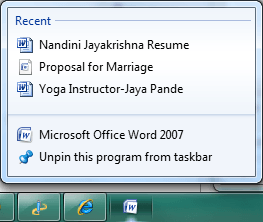
With Jumplists, that functionality basically moved from the Start Menu to the Taskbar! For example, if you open several Word documents and then right-click on the Word icon in the taskbar, you’ll get the following:

clear windows 7 jumplists

Hmm, maybe you didn’t want anyone to see that marriage proposal Word doc! Ok, bad example, but you see my point. The jumplist has a list of recent documents opened in Word. Great if you want quick access to a Word doc without having to browse in Windows Explorer, but not great if you want to hide this information.

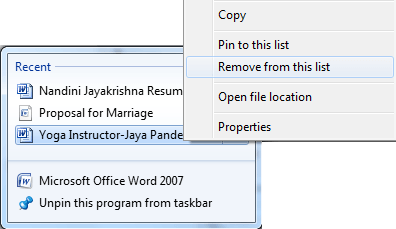
Now this is just Word! Each program can have it’s own list of recent documents or files or whatever else that show up. The only obvious way to delete the entries from the jumplist right now is to right-click on an item and choose Remove from this list.

remove jumplist items

This is pretty painful for many different apps! Luckily, there is an easier way to remove multiple items from many jumplists at once. All recent items in any jumplists are stored by Windows in a hidden location. You can get to them here:

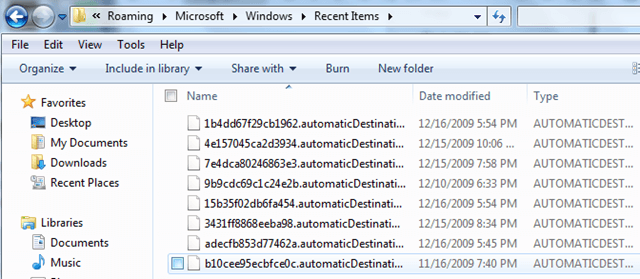
%APPDATA%\Microsoft\Windows\Recent\AutomaticDestinations

Copy and paste that into Windows Explorer. Now you will see a list of files with very long and convoluted names. This is because they are all encoded. Each one represents a list of recent items for a particular jumplist.

clear jumplists windows 7

It’s impossible to tell which entries go with which jumplists unless you open the file in a text editor and browse through. However, since all of the files are just recent items in a jumplist, you can delete all the files and it will clear all recent items on all jumplists.

You can also run a simple command from the command prompt to do the same thing:

del %appdata%\microsoft\windows\recent\automaticdestinations\*

You can then add this to a Windows batch file and run it by just double-clicking on the shortcut. You can read my previous post on how to create Windows batch files. [via gHacks]

Delete or Clear Jumplist Recent Items in Windows 7

Thursday, October 13, 2011

Her Campus: 7 Ways to Clean Up Your Facebook Profile For College Admissions


From -- http://www.hercampus.com/high-school/private-professional-7-ways-keep-your-facebook-profile-clean-during-college-admissions-p


7 Ways to Clean Up Your Facebook Profile For College Admissions

Posted: 10/10/11 03:47 PM ET

Follow

Facebook Privacy , Facebook , College Applications , Facebook College , Hercampus , High School News

At first, Lauren untags herself from any photos with red cups in sight. Next, she replaces obscene rap lyrics with sayings by Thoreau in her "Favorite Quotes" section. And finally, just minutes before hitting the "submit" button on the Common App, she changes the spelling of her name on Facebook to Loryn in an attempt at anonymity. Lauren isn't entering the witness protection program or hiding from the FBI -- she's simply using caution while applying to colleges. But do college admissions officers truly Facebook-stalk all incoming applicants? To what extent should you do a little Facebook spring-cleaning? Are there any red flags on your profile, and if so, how can you fix them? Her Campus sat down with Shawn Abbott, Assistant Vice President for Undergraduate Admissions at NYU, to learn more about what role Facebook plays in the college application process.

How do college admissions officers use Facebook?

A 2011 Kaplan study shows that more than 80 percent of colleges consider their applicants' social media presence when reviewing applications. However, if you're worried about college admissions officers picking through your Facebook profile with a fine-toothed comb, take comfort in the fact that admission committees aren't likely to spend hours looking through your junior varsity volleyball photo album or scrolling through status updates dating back to 2009.

While admissions officers do check for obvious no-nos -- wall posts from friends along the lines of, "I can't believe how out of control you were last night" and explicit profile pictures -- the goal of the search isn't to get applicants into trouble. "Admission counselors search for students on Google and other search engines -- sometimes out of curiosity and sometimes to verify claims that an applicant will make in his or her application with regard to leadership or involvement with a particular organization or activity," says Abbott. Considering this angle, keeping your profile easily accessible and searchable might actually work to your advantage -- as long as your profile is clean. "I treat my profile as a way for college admissions officers to get to know me outside of my academic accomplishments," says Meg Enciso, an HC High School Ambassador from Ontario.

Considering the high volume of applications each school receives, there's simply no time to launch extensive internet investigations on every applicant. "If I can't find someone on Facebook, I certainly don't spend an extraordinary amount of time hunting them down," says Abbott. If you change your name on Facebook, you may be able to dodge the profile scan. Don't let a new Facebook name lull you into a false sense of security, though; Abbott warns, "We sometimes receive screen shots of internet activity that can be called into question."

How are pre-collegiettes dealing with this issue?

"When I was in high school, I didn't change my Facebook at all during college admissions," says Caitlin Fernandez, a Her Campus Branch Manager, Campus Correspondent, and Virginia Tech sophomore. It appears that as Facebook becomes more widespread, students are becoming more cautious with their online presence. "Most of my friends have either deleted their accounts or intensified their privacy settings," says Deborah Vasquez, an HC High School Ambassador from Florida.

Some students strive to keep their profile out of sight by changing their Facebook name. While some opt for unusual spellings or replacing their first or last names with words (e.g., Olivia Sunshine), others replace their last name with their middle name. Kiley K., an HC High School Ambassador from Connecticut, says, "I use my middle name as my last because I don't want people who don't personally know me friend requesting me or checking out my profile, especially college admissions officers!"

1. How should you clean up your Facebook profile?

Cleaning up your Facebook profile doesn't have to be difficult. "Common sense is key," Abbott explains. "You don't have to live undercover on the Internet. You should simply avoid posting pictures or messages that could come back to haunt you later." Take his advice to heart and keep your profile professional with these easy adjustments.

Remove or untag problematic photos.
Go through your profile pictures, albums, and tagged pictures and remove or untag any photos that could potentially cause trouble. The rule of thumb? If you wouldn't want to show the photo to your grandparents, you don't want it on your Facebook, either. Specifically, make sure to remove all traces of photos that include:

  • Drinking and drugs - even if you're not the one holding the beer!
  • Party photos that don't have any illegal substances in view, but you look like you're having a little too much fun.
  • Nudity. (Beach vacation photos with your family? Totally okay. Party photos sans pants? Not okay at all.)
  • Make-out sessions with your boyfriend. We know you think the album is adorable, but college admissions officers might not.
  • Your profile picture is especially visible, so take extra precaution to ensure that it's G-rated and promotes a positive image.

How to do it:

  1. To remove a photo, click the "Remove Photo" link directly under the bottom right corner of the photo.
  2. To remove the tag, click on "Report/Remove Tag" on the bottom right corner of the screen.

2. Use Profile Review.

This feature is an easy way to keep your profile in check. Every time a friend posts on your wall -- whether in the form of a wall post, photo, video, or status update -- you will be required to approve it. This gives you ultimate control over what appears on your profile; there's no risk of questionable photos or wall posts appearing on your wall without your knowledge.

How to do it:

  1. Go to "Privacy Settings."
  2. Click on "How Tags Work."
  3. Select "Profile Review."

3. Edit your Profile.

Now would probably be a good time to remove "lax bros" from your Interests section. You don't need to broadcast a fake interest in medieval poetry or quantum physics (unless you truly have a passion for those subjects), but make sure the information in your profile is clean and professional. Check to see that your Favorite Quotes section is free of any references to illegal activities and obscene or offensive language.

How to do it:

  1. Click "About," right above your timeline.
  2. Scroll to the section you'd like to change, and edit your basic information, activities and interests, contact information, and more.
  3. Make sure to hit "Save Changes" at the end!

Her Campus: 7 Ways to Clean Up Your Facebook Profile For College Admissions

Friday, October 7, 2011

Test–Just a Test

Testing windows live writer from my new PC!


Lets see if it works…..


HSM

Wednesday, October 5, 2011

Test ScribFire

Lookign for a replacement for blog this with windows live writer....

Goint to look at the 60 apps in 60 min for the blogging apps mentioned at SLA since I need to find a new firefox tool...


Thanks - HSM

Friday, September 16, 2011

Green Business News, Resources, and Sustainability Career Tools | Business | GreenBiz.com


Green Business News, Resources, and Sustainability Career Tools | Business | GreenBiz.com


Our mission is to provide clear, concise, accurate, and balanced information, resources, and learning opportunities to help companies of all sizes and sectors integrate environmental responsibility into their operations in a manner that supports profitable business practices.

Our goals are to:
  • Be the leading source of news and opinion on business and the environment.
  • Serve as an information clearinghouse on green business practices, offering resources from companies, nongovernmental organizations, trade associations, government agencies, academic institutions, and thought leaders.
  • Help readers turn information into knowledge and action by providing hands-on tools, expert advice, and case studies.
  • Provide access to environmental sources and products.
  • Facilitate increased communication, information sharing, and learning among green professionals and other interested parties.
  • Promote increased understanding of green business practices to government entities, nongovernmental organizations, news media, investors, students and academics, and the public at large.
  • Provide deep, vertical coverage of green business by sector and job function, ranging from product design to facility management, information technology to branding and marketing.
What We Believe
  • A revolution is taking place that is leading companies of all sizes and sectors to comprehensively address environmental issues as part of their strategy and operations -- rethinking their policies, processes, and products, and their relationships with a variety of stakeholders and trading partners.
  • Environmental concerns have resulted in a confluence of technologies, innovations, and creative thinking being unleashed that is enabling companies to transform such challenges into new business opportunities and competitive advantage.
  • Companies address their environmental impacts in a variety of ways and for a variety of reasons -- some voluntarily and others less so -- but all should be welcome and encouraged, regardless of their motivations or levels of commitment.
  • Companies that go beyond society's regulations and expectations in addressing their environmental challenges often find that they can create new forms of business value, including both tangible and intangible measures of success.
  • Those working inside companies -- from owners and bosses to managers and line employees -- overwhelmingly want their companies to be good corporate citizens, though most individuals lack the time, expertise, or resources to make significant changes.
  • No company, even the most committed, will ever be perfect, from an environmental perspective, though they should be encouraged to continually improve their performance, and to make bold commitments and actions.
  • Companies can be a powerful force for good, helping to solve the planet's and society's most pressing problems -- and do so in a way that aligns with their business goals and objectives.
  • The time for companies to act is short, and the challenges are great -- but so are the opportunities.

About Us